

Book a Class in Seconds
Select a class, choose your spot when required,
and watch your booking appear on the dashboard.
Booking Dashboard
· LiveTotal Bookings
48
+18% vs yesterday
Checked In
34
71% today
Occupancy Rate
88%
+12% vs avg
No Shows
2
low
Today's Schedule
4 classesHIIT Cardio Blast
18/20 Booked
09:00 AM · Emma Wilson
Reformer Flow
12/14 Booked
10:30 AM · Oliver Smith
Cycling Peak
20/20 Full
12:00 PM · Ava Martinez
Teens Strength
9/12 Booked
4:00 PM · Sophia Brown
Staff Today
4 Active- EW
Emma Wilson
Head Trainer
- OS
Oliver Smith
Coach
- AM
Ava Martinez
Coach
- SJ
Sarah Johnson
Coach
Class Schedule & Timings
Browse programs, pick a date, and reserve your spot.
Pick a date
Teens Program
Gym Wear
One-to-One Training
Gym Wear
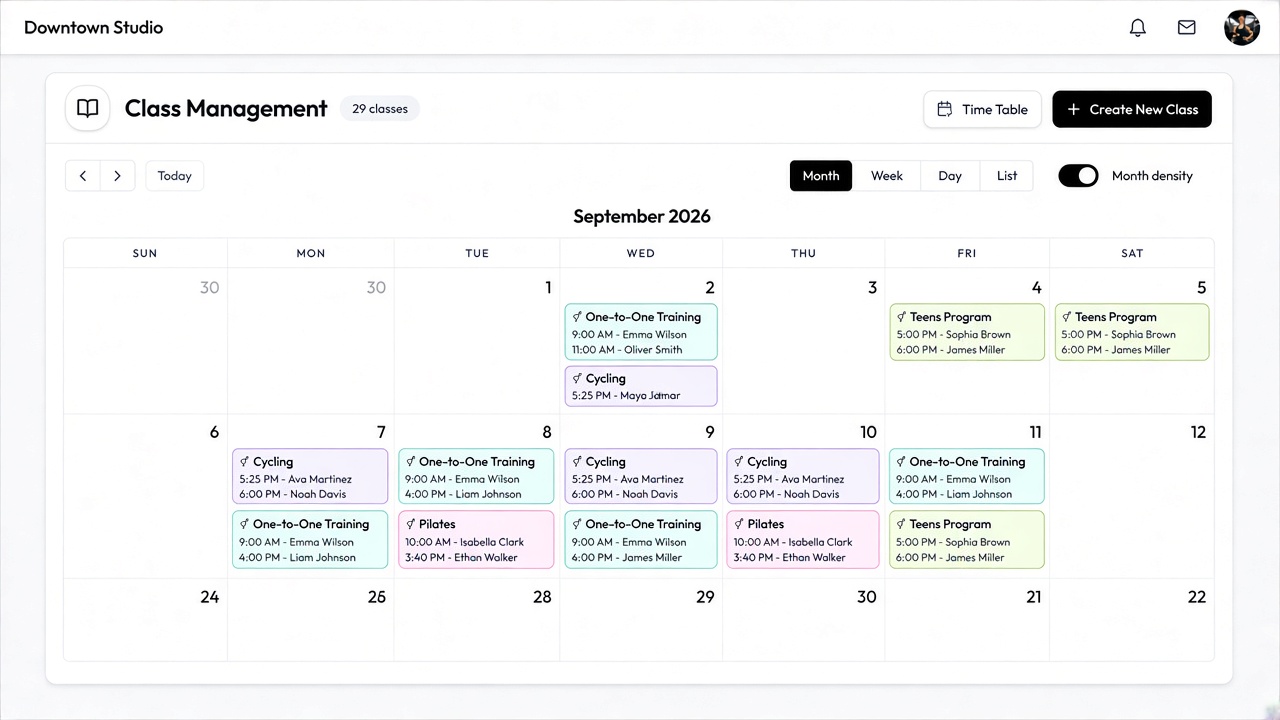
One calendar for every class
Put your whole term on one month grid — color-coded by program, with trainer and time on every chip. Members book against live capacity; waitlists fill empty spots automatically.
- Programs, trainers and rooms in one scan
- Month, week, day or list — same schedule
- Create a class from any empty slot
- One-to-One
- Cycling
- Pilates
- Teens
Peak Spin Session
Mon, Sep 21 · 5:30 PM · Bike studio
Pick a spot
Live booking previewBooking as Female · Open seats
 Coach
CoachLet clients choose their spot
Draw the room once — bikes, mats, or reformers — and members pick their seat when they book. Favourite bike by the mirror or the mat nearest the fan: they choose before they walk in.
- Floor plans per program — seats named your way
- Live free / booked states on every spot
- Capacity comes from the seats you drew
Bring in new clients with multichannel booking options
Publish a class once and it appears on your booking website and embeds — members book from any browser or the FitnezStudios app. Waitlists promote themselves when a spot opens, and your desk sees the same fill live on the booking dashboard.
- Booking website subdomain, or embed on the site you already run
- Self-serve booking and waitlists from phone or browser
- Same schedule the desk runs — occupancy and check-in stay in sync
Dashboard
· LiveToday's bookings
24
Upcoming classes
8
New clients
12
Recent activity
- 09:30 AM
Sarah booked
Morning Pilates
- 10:15 AM
Alex booked
HIIT Cardio Blast
- 11:00 AM
Maya booked
Reformer Flow
Calendar
One-to-One
9:00 AM
Tue
Pilates
11:00 AM
Wed
Teens
4:00 PM
Fri
Class Schedule & Timings
Browse upcoming classes and find the perfect time slot.
All Programs
Monday, Sep 21
Peak Spin
05:30 PM - 06:15 PM
Stacy Richmond
Pilates Flow
06:30 PM - 07:20 PM
Stacy Richmond
Yoga Basics
07:30 PM - 08:15 PM
Stacy Richmond
Manage Checkins through QR System
Members can check in to their booked classes using their personal QR code. Just open the QR in the FITNEZ STUDIOS app and let the front desk scan it.
- 1Step 01Open QR code in the appMembers open Check-in from the app to display their unique QR code.
- 2Step 02Scan QR code to check inThe front desk scans the QR code and the booking is instantly marked as checked in.
FITNEZ STUDIOS
Check in
Show this QR code at the front desk
Sarah Wilson
Yoga Flow · 06:00 PM
Your studio
Classes & Bookings
Scan member QR
Position the member's QR code inside the frame
Ready to scan
Check-in demo idle.
See your own timetable in it.
Bring your current schedule to the call. We will build a week of it in front of you.
30 minutes, no slide deck — and we migrate the rest if you switch.